INTELLIGENCE DEVELOPER PLATFORM

AI Agent Trading Infrastructure — Connect Models to Markets Safely

The Intelligence Developer Platform is infrastructure for building AI trading applications: a trading harness, MCP connectivity, model orchestration, and tool connectors governed by permissions, guardrails, and audit logs. It is the developer-facing layer beneath Coiny's AI trading intelligence platform — the same models and the same connectors, exposed as something your engineers build on rather than a product they consume.

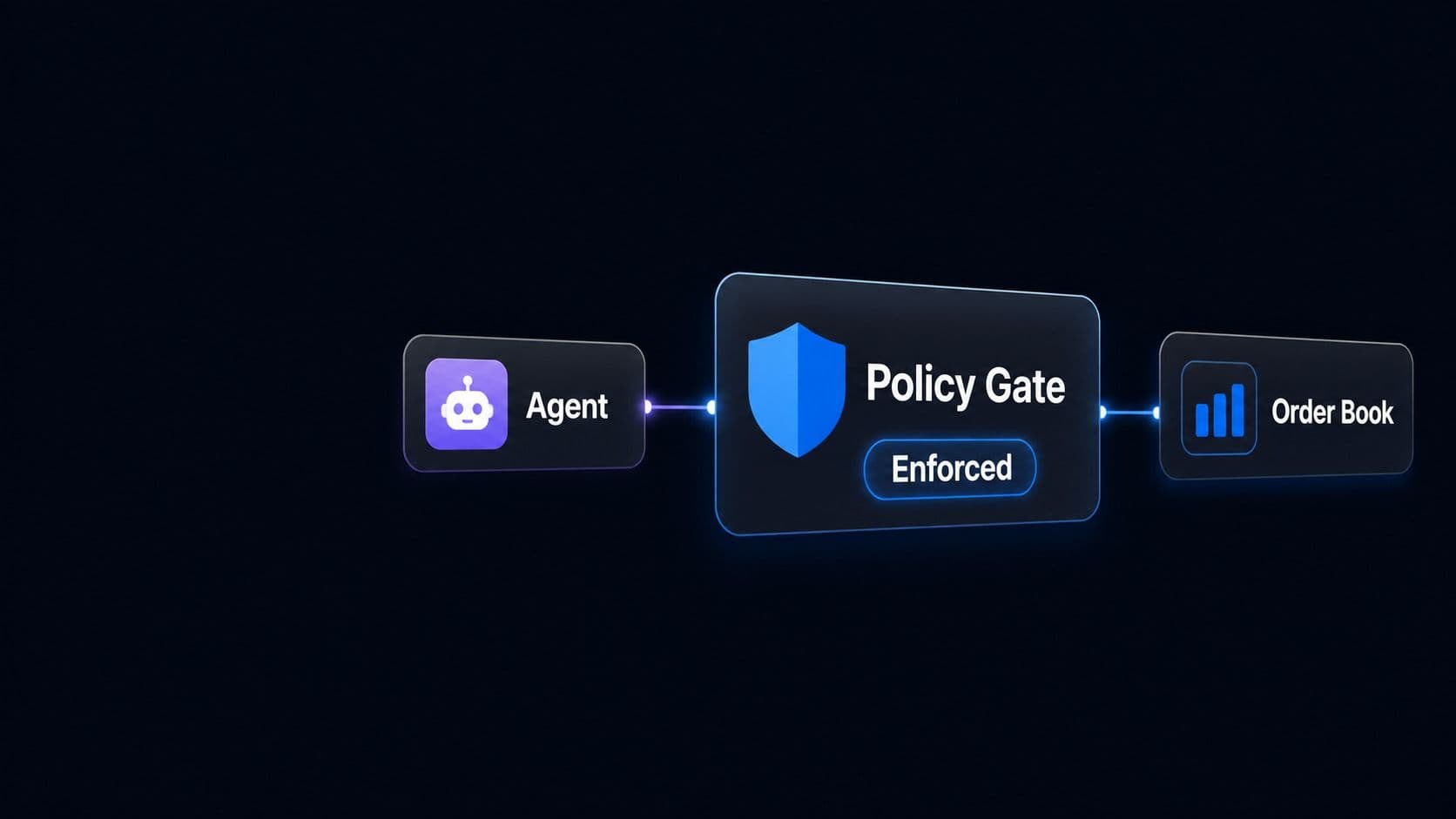
An agent reaching the order book only through an enforced policy gate
  • Trading harness

    A runtime that hands a model a bounded set of tools, checks every call against the agent's scope and the operator's limits, and holds the credentials the model never sees.

  • MCP connectivity

    Market data, portfolio, research, risk, trading and operations exposed as Model Context Protocol servers, so any MCP-capable client or agent framework reaches them without a bespoke integration.

  • Permissions and guardrails

    Deny by default per tool, venue, instrument and size, with pre-trade checks, rate limits, approval gates and a kill switch enforced by the platform rather than by the prompt.

  • Private deployment and audit

    Runs in your VPC or a dedicated tenant, with every prompt, tool call, argument, verdict and approver written to an exportable audit trail as the run happens.

THE HARNESS STACK

Four Layers Between a Model and a Live Order

An agent that can trade is only as trustworthy as what sits between it and the matching engine. That middle is the product: four layers your team configures, none of which a model can talk its way past.

Models and orchestration
LAYER 01

Models and orchestration

A router picks the model for each task by capability, cost and latency, and falls back when a provider is unavailable. GPT, Claude, Gemini and Grok are all available, and swapping the model behind a workflow changes neither its tools, nor its permissions, nor the shape of its audit record.

1 of 4
ARCHITECTURE

How a Model Reaches a Market, and What Stands in the Way

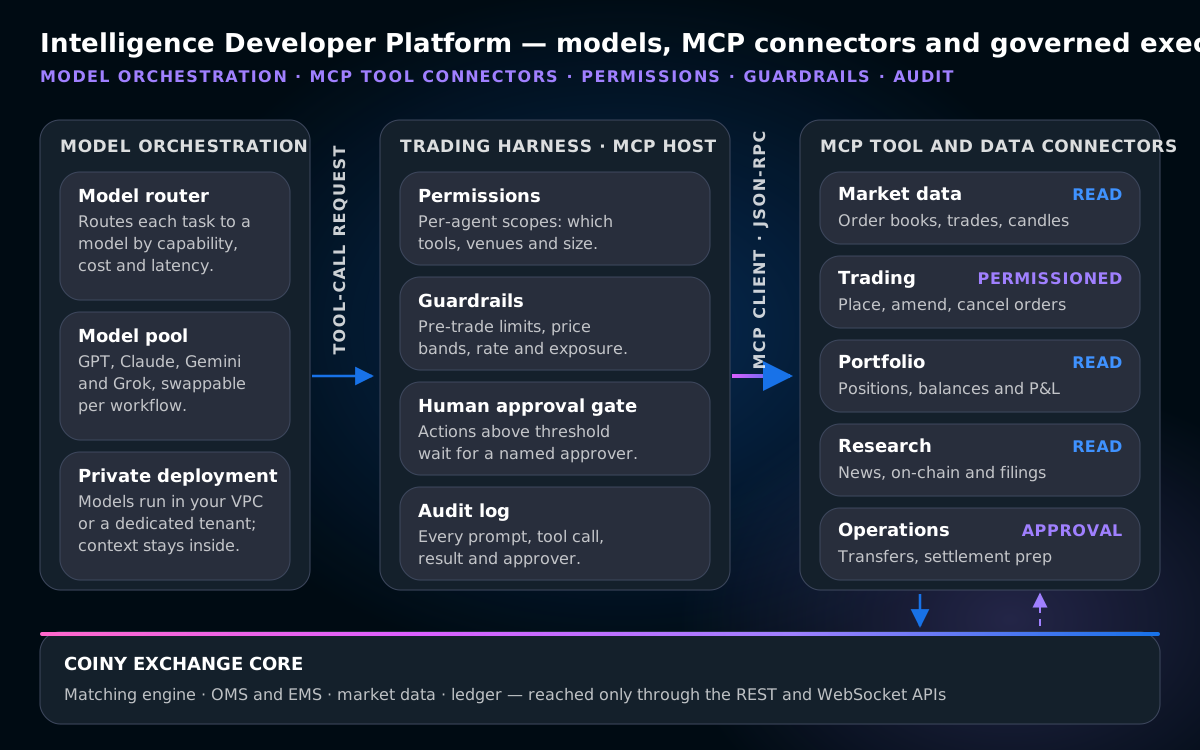
Models on the left, the harness in the middle holding permissions, guardrails, approvals and the audit log, MCP connectors on the right, and the exchange core underneath — reachable only through the REST and WebSocket APIs.

Diagram: models, MCP tool connectors, market data and permissions composed into governed trading workflows

Read it right to left as well. Results, fills and errors return along the same path, and each one is written to the run trace before the model is allowed to see it.

TOOL AND DATA CONNECTORS

What an Agent Can Actually Reach

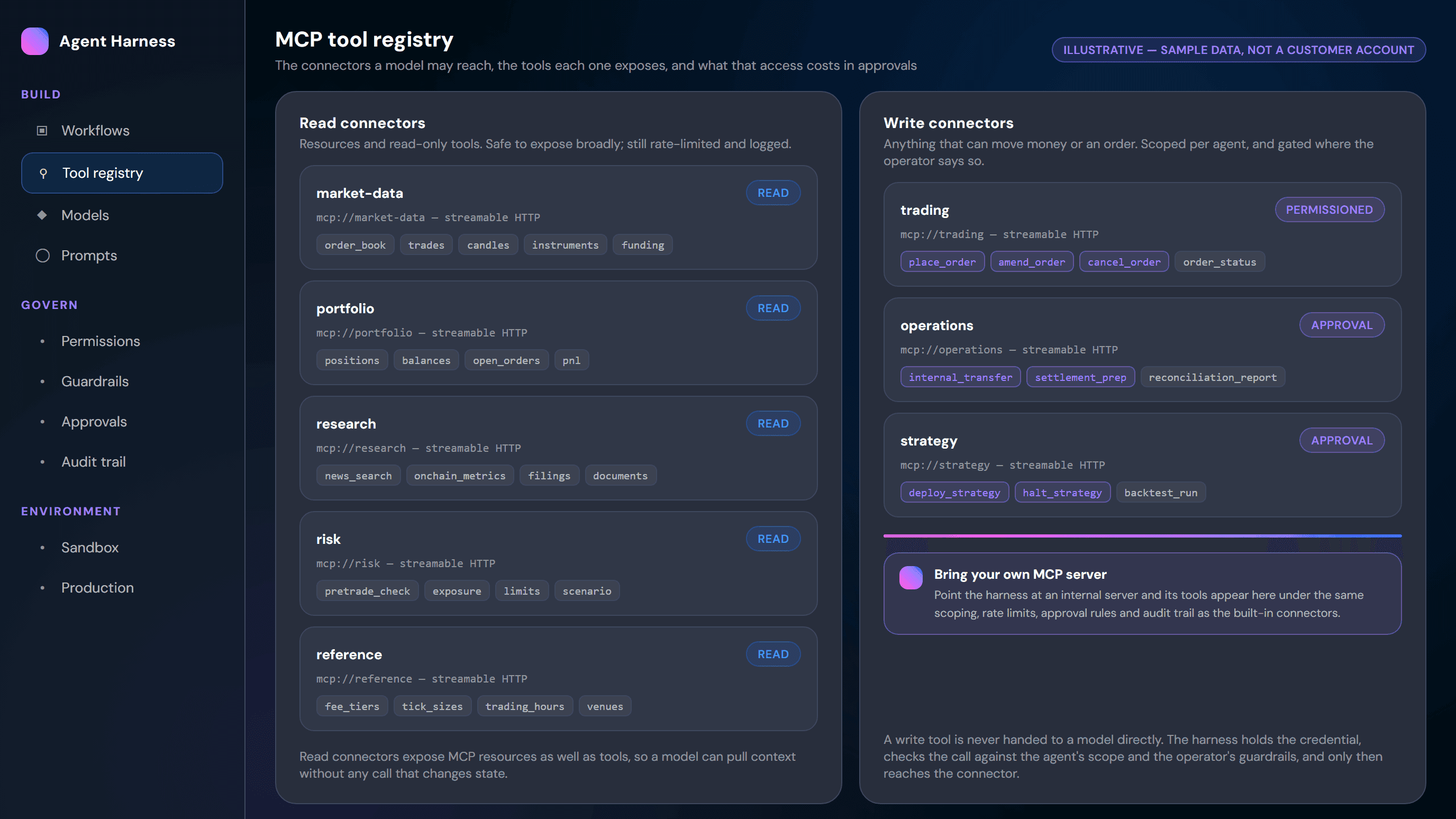
Every connector ships as an MCP server with typed tools and read-only resources. Registering one makes it available to the harness; granting it to a role makes it visible to that role's model. Nothing is exposed by default, and an internal MCP server your team writes lands under the same scoping, rate limits, approval rules and audit trail as the connectors below.

READ

Market data

Order books, trades, candles, instruments and funding for every market your platform runs, at the resolution the exchange stack records them.

  • Point-in-time queries and streaming subscriptions
  • Reference data so costs are read, not assumed
READ

Portfolio

Positions, balances, open orders and P&L, scoped to the accounts a given agent is bound to rather than to the whole book.

  • Account scope is part of the grant, not the prompt
  • Live and as-of views
READ

Research

News, on-chain metrics, filings and your own internal documents, so an agent builds context without anything leaving the permission boundary.

  • Document access follows your existing entitlements
  • Answers carry the sources they were drawn from
READ

Risk

Pre-trade checks, exposure and limit queries. An agent can price and screen a proposal against the deployment envelope before a person ever sees it.

  • The failing check is named, not just the rejection
  • Scenario and exposure queries for sizing
PERMISSIONED

Trading

Place, amend and cancel orders through the same engine your traders use. Scoped per agent by venue, instrument and size, and gated by the operator's approval threshold.

  • Deny by default; a grant is an explicit act
  • Above threshold, execution waits for a named approver
APPROVAL

Operations and strategy

Internal transfers, settlement preparation, and promoting or halting a strategy. Write tools that always sit behind a named human approval, whatever the agent proposes.

  • Every proposal carries its inputs to the approver
  • Halting is available to the operator at any moment
WHAT IS ENFORCED, AND WHERE

Every Control, and the Layer That Applies It

The question this page has to answer is not whether an agent can trade. It is what stops it. Every control below is enforced by the platform rather than by instructions in a prompt — a model told to ignore a limit still cannot exceed it.

#ControlWhere it is enforcedWhat happens when it binds
1Tool visibilityHarness, before the model sees the tool listdeny by defaultA tool the role was never granted does not appear, so the model cannot request it
2Scope checkHarness, on every callvenue, instrument, accountThe call is refused, the connector is never reached, and the model is told why
3Pre-trade limitsRisk service, before an order is stagedsize, notional, exposureThe proposal is rejected with the failing check named in the result
4Price bandExchange core, at order entrydistance from midThe order is refused rather than quietly repriced
5Call rate limitHarness, per tool and per agentper minuteFurther calls are throttled and the run is flagged for review
6Approval thresholdHarness, before a write tool executesoperator-setThe action queues for a named approver and nothing leaves the harness
7Kill switchHarness and exchange coreone actionThe agent halts and its working orders are cancelled
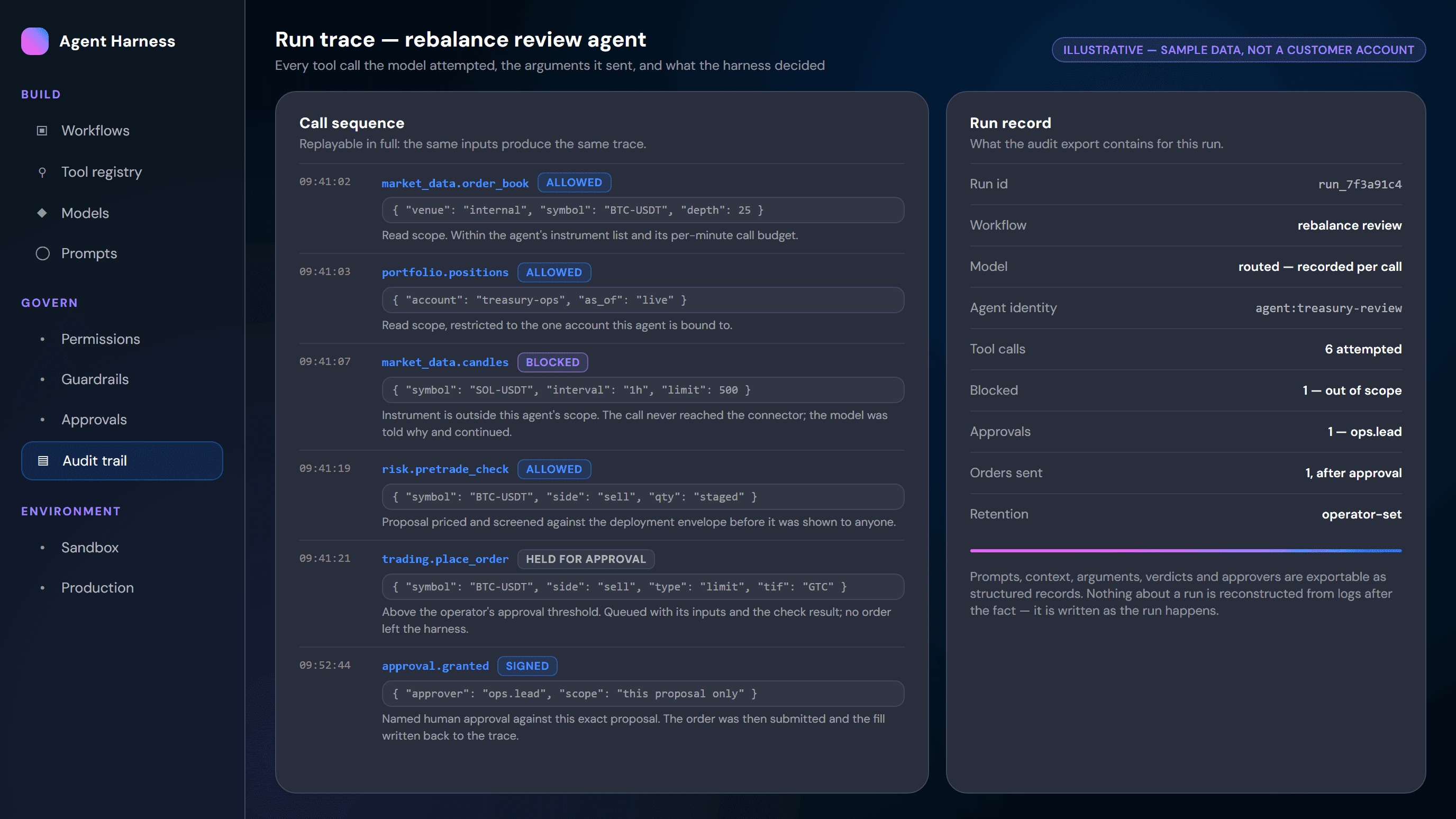
8Audit writeHarness, as the run happensnot reconstructed laterCall, arguments, verdict and approver are recorded, refusals included
INSIDE THE HARNESS

The Console Your Team Governs From

Everything here is also an API call, so teams that live in code never have to open it. It exists so the people accountable for the money can see what the agents are permitted to do, and what they did.

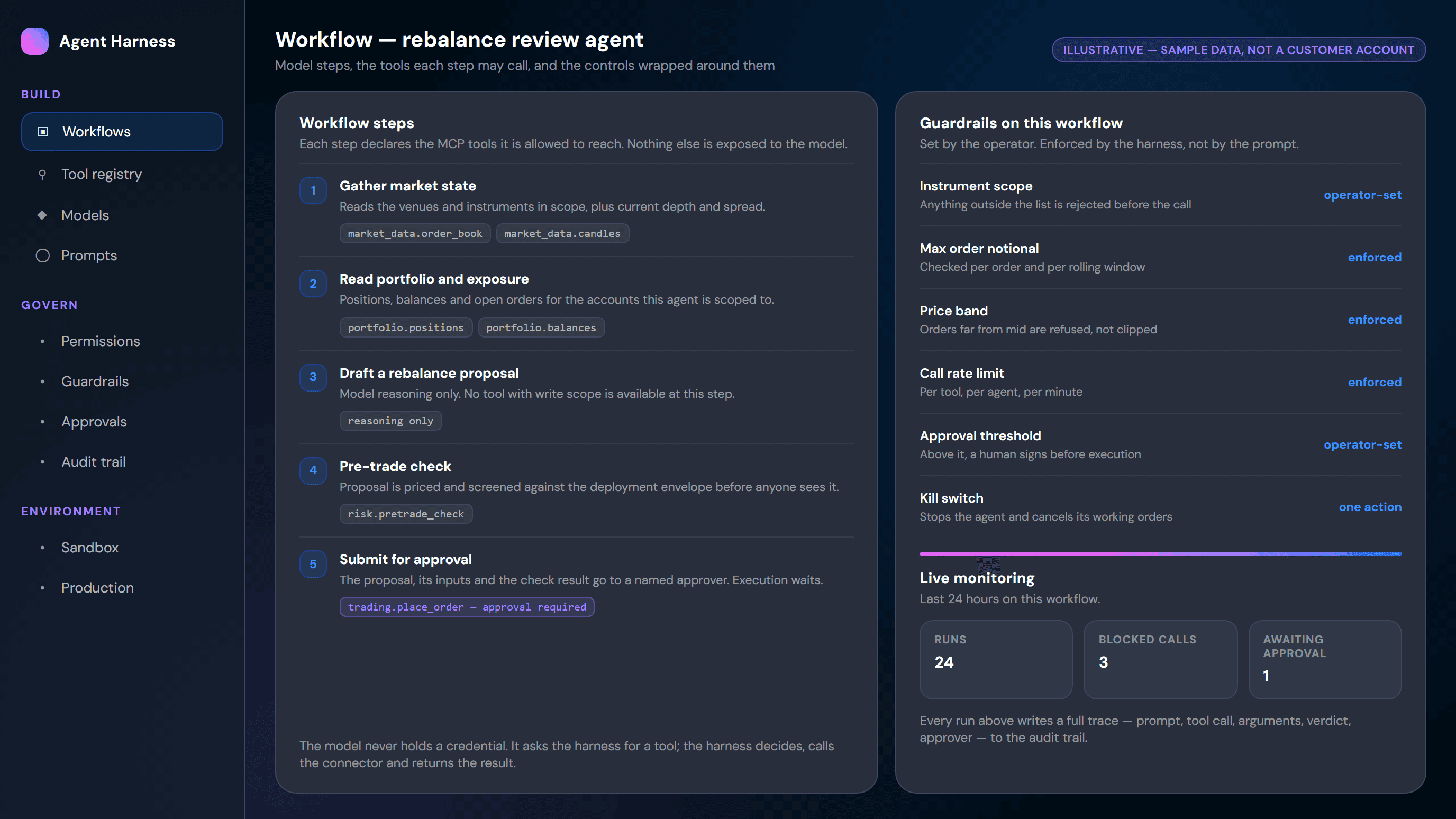
Define the workflow and the tools each step may call

A workflow is a sequence of steps, and each step declares the tools it is allowed to reach. The drafting step of a rebalance agent has no write tool at all; the submitting step has one, and it is marked as requiring approval.

  • Per-step tool declarations, not one blanket grant for the whole agent
  • Guardrails attached to the workflow: scope, notional, price band, rate, threshold
  • Live monitoring of runs, blocked calls and anything waiting on an approver
  • The kill switch stops the agent and cancels its working orders in one action
Developer console showing a workflow with guardrails, monitoring and audit trail
PERMISSIONS AND AUDIT

Deny by Default, and a Record of Everything That Followed

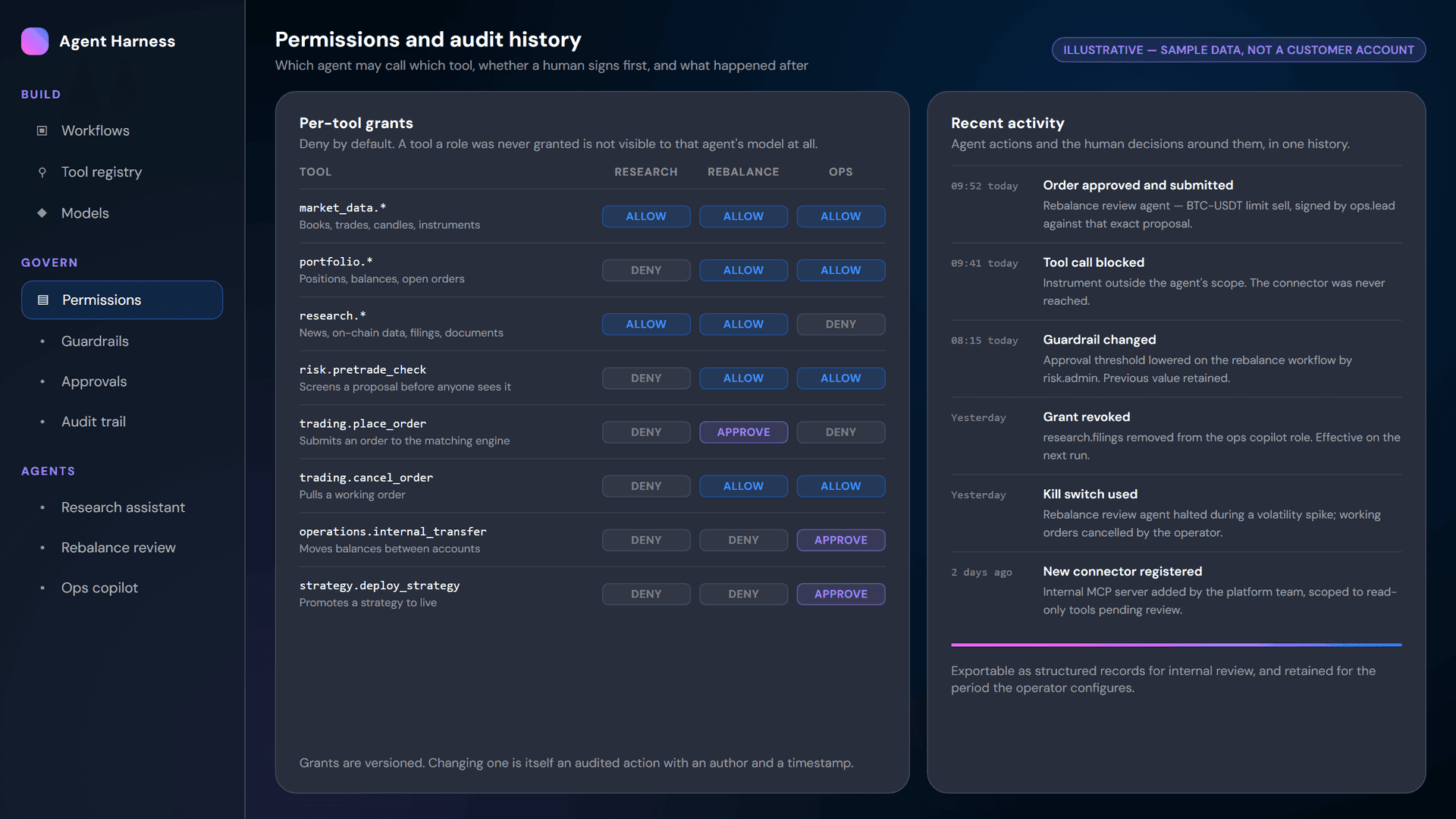
Permissions are the product surface here, not a settings page buried three menus deep. An agent's role decides which tools exist for it at all, and every grant, change, call and approval belongs to one history.

Roles, not keysAn agent is bound to a role, and the role carries the grants. A tool the role does not have is not in the model tool list.
Three grant statesAllow, approve or deny, per tool. Approve means the call is real but execution waits for a named person.
Versioned changesWidening a grant, lowering a threshold or revoking access is itself an audited action, with the previous value retained.
One activity historyAgent actions and human decisions appear together: the blocked call, the guardrail that changed, the approval that followed.
Exportable evidenceRun records leave as structured data for internal review, retained for the period the operator configures rather than a period we chose.
Credentials the agent never seesKeys stay with the harness, not the model. An agent names a tool; the platform holds the credential and decides if the call is permitted.
Review the Controls With Us
ENGINEERING QUESTIONS

What a Platform Team Asks Before Letting an Agent Near the Order Book

  • Do we have to use your agent framework?No. The connectors are MCP servers and the exchange itself speaks REST and WebSocket, so an agent written in your own framework can use them directly. Teams that want the permission model, approval gates and audit trail run through the harness; teams that only need data start with the read connectors and add the rest later.
  • Can a prompt injection make an agent place an order?It cannot reach a tool the agent's role was never granted, because that tool is not in the model's tool list at all. For tools it does have, scope, size, exposure and price-band checks run in the harness and the risk service after the model has spoken, and anything above the approval threshold still waits for a person.
  • Where do the model providers see our data?That is your decision. The platform deploys inside your VPC or a dedicated tenant, and the operator configures which providers are reachable from it. Prompts, market context, portfolio data and internal documents stay within that boundary, and the audit store lives there too.
  • How do we prove to a risk committee what an agent did?With the run trace. Every attempted call, its arguments, the harness verdict, the refusals and their reasons, the approver and the resulting fills are written as the run happens and exported as structured records — not reconstructed from application logs after someone asks.
  • What happens when a model provider degrades or goes down?The router falls back to another model, and because the harness owns the tools, permissions and audit format, the workflow is unchanged by the switch. Which model served each call is itself recorded, so a change in behaviour can be traced to the change in model.
Talk to an Engineer
BUILT FOR

Teams Building Agentic Trading Tooling on Their Own Platform

The buyer here is the person who has to sign off on an agent touching the order book.

Platform and AI engineering teams

Engineers with a working agent prototype and no safe path to production. The harness supplies credential isolation and approval routing.

Funds and prop desks

Quant teams that want models reading live market and portfolio state without handing them trading keys.

Exchange operators running Coiny

Operators already running the trading stack who want to offer agent tooling to their clients — no second integration, no second set of credentials.

Risk, compliance and operations owners

The people who answer for what an automated system did: grants they can read, thresholds they set, a kill switch they hold, and a full run trace.

CONNECTED SYSTEMS

What This Platform Sits On, and What It Powers

The intelligence layer is not a separate product bolted to the side. It reaches the same engines, the same market data and the same venue connectivity that the rest of Coiny's stack runs on.

AI trading intelligence platform

The applied layer built on this infrastructure: research, strategy, execution, portfolio, operations, compliance and treasury workflows, delivered as products rather than as an SDK.

core exchange APIs

The foundation everything above rests on. REST and WebSocket access to trading, market data and strategy connectivity, with SDKs, webhooks, authentication, rate limits and an isolated test environment.

integration catalogue

The venue, payment, custody, compliance and trading-platform connections Coiny ships with, including FIX, MT5 and cTrader.

backtesting infrastructure & strategy APIs

Where a strategy is tested before an agent is allowed to run it. Historical data, walk-forward and robustness analysis, and the same strategy endpoints the harness calls when a promotion is approved.

dedicated DEX chain

One of the deployment targets an agent can be pointed at. Teams running a dedicated chain use the same harness, connectors and permission model against their own venue rather than a separate toolchain.

developer platform overview

The whole build surface in one place: the integration catalogue, the exchange APIs and SDKs, and this intelligence infrastructure, with the boundaries between them spelled out.

COMMON QUESTIONS

FAQ

MCP, the Model Context Protocol, is an open standard for connecting AI models to external tools and data through a common interface, so an application does not need a bespoke integration for every system it touches. In trading, Coiny Exchange exposes market data, portfolio, research, risk, trading and operations as MCP servers. An MCP-capable client or agent framework calls them as typed tools, while the harness hosting the connection decides which tools that agent is allowed to see.

You connect an AI agent to an exchange safely by never giving the model direct access: put a trading harness between them that holds the credentials, exposes only the tools that agent's role grants, checks every call against operator-defined scope and limits, and requires a named human approval above a set threshold. Coiny Exchange ships that harness with MCP connectors, pre-trade guardrails, rate limits, a kill switch, and an audit trail written as the run happens.

AI trading agents should have guardrails at four levels: tool permissions that are deny by default, scope limits on venue, instrument and account, pre-trade checks on order size, notional, exposure and price band, and a human approval gate above a threshold the operator sets, backed by call rate limits and a kill switch. On Coiny Exchange's Intelligence Developer Platform each of these is enforced by the platform rather than by prompt instructions, and every refusal is logged.

A trading harness is the runtime that sits between an AI model and a trading system. It assembles the model's context, presents a bounded set of tools, holds the API credentials the model never sees, checks each tool call against permissions and risk limits, routes anything above a threshold to a human approver, and records the whole run. Coiny Exchange's harness is the core of its Intelligence Developer Platform and hosts the MCP connections to the exchange.

Agents run autonomously only inside limits the operator defines, and any action above the approval threshold waits for a named person before it executes. Coiny Exchange's harness enforces scope, size, exposure and rate limits on every call, refuses anything outside them, and gives the operator a kill switch that halts the agent and cancels its working orders. Research and analysis workflows can run unattended; write actions stay governed.

Yes. Coiny Exchange deploys the Intelligence Developer Platform inside your own VPC or a dedicated tenant, so prompts, market context, portfolio data and internal documents stay within your boundary. Model orchestration, the MCP connectors, the permission model and the audit store all run in that environment, and the operator decides which model providers are reachable from it and how long run records are retained.

Model orchestration routes each task to a model chosen by capability, cost and latency, with a fallback when a provider is unavailable. Coiny Exchange's platform supports GPT, Claude, Gemini and Grok, and the model behind a workflow can be swapped without altering that workflow's tools, permissions or audit format, because the harness rather than the model owns the connection to the exchange.

Every action an AI agent takes on Coiny Exchange's platform is written to an audit trail as it happens rather than reconstructed from logs afterwards: the prompt and context, each tool call with its arguments, the harness verdict, refused calls and the reason for them, any approver who signed, and the resulting orders or fills. Records are exportable as structured data and retained for the period the operator configures.

BUILD ON IT

Put Your Agent in Front of a Harness That Can Say No

Walk through the architecture with our engineers: the MCP connectors, the permission model, the guardrails and approval gates, private deployment, and what the audit trail hands your risk committee. Bring the prototype you already have.

Book a Demo