OMS / EMS

The Order and Execution Management System Your Desk Runs On

Coiny's OMS/EMS is an institutional order and execution management system with a real-time blotter, pre-trade risk controls, multi-venue routing, post-trade allocation, and reporting.

  • One blotter, every orderParent orders, child orders, working quantity, average price and venue attribution on a single screen, updating as fills arrive rather than at the end of the day.
  • Controls that run before the order leavesCredit and limit checks, price collars, size caps, venue allowlists and restricted-instrument lists on every order, with a four-eyes approval gate above the thresholds you set.
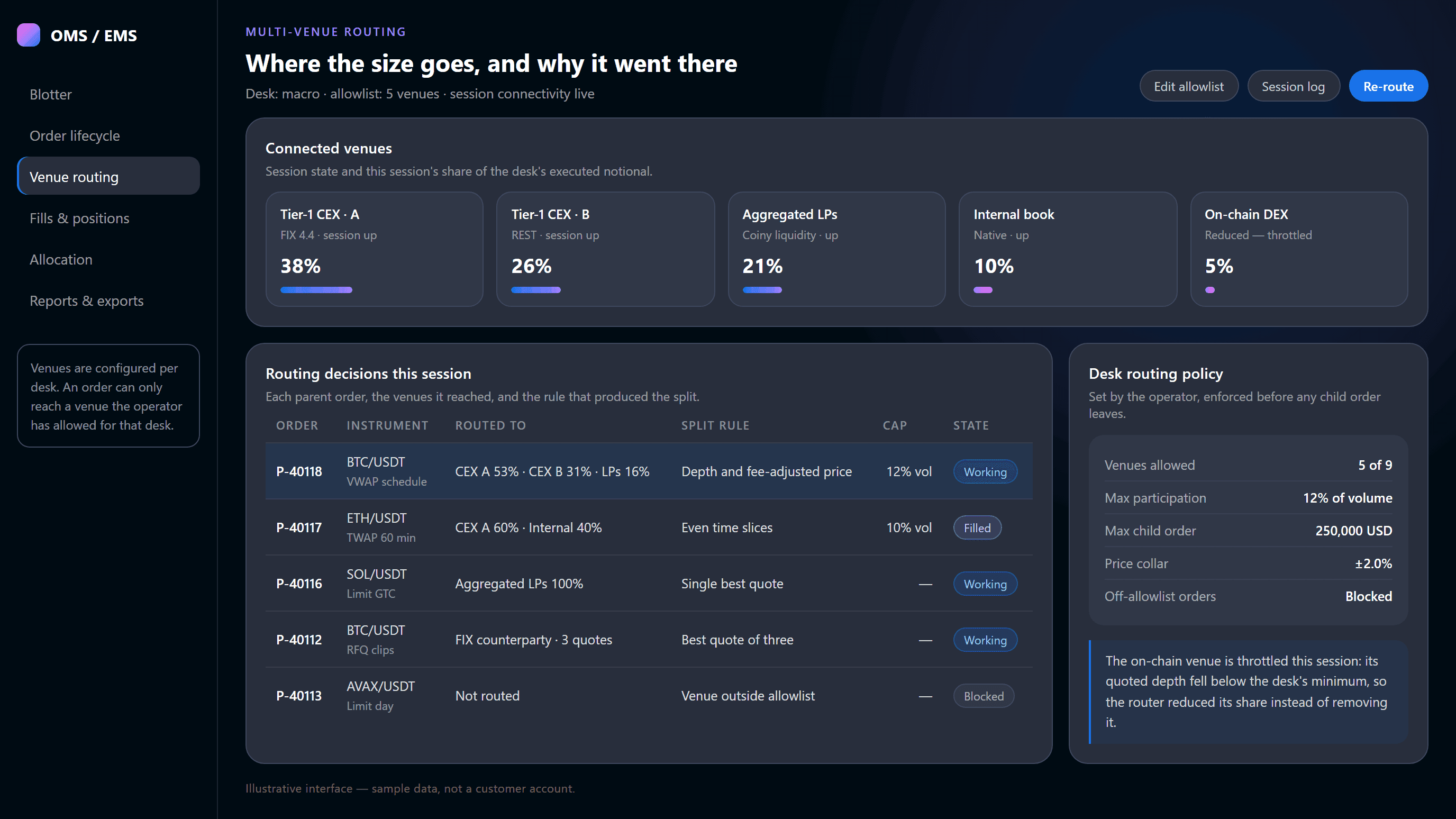
  • Routing across the venues you allowSplit a parent order across tier-1 exchanges, aggregated liquidity, on-chain venues, your internal book and FIX counterparties, inside participation and price limits per desk.
  • Allocation and reporting out of the workflowAccount-level allocation at the block average price, confirmations, settlement records and best-execution reporting built from the same order records — not re-keyed into a spreadsheet.
Book a Desk Demo
Pre-tradecontrols on every order
Multi-venuerouting and aggregated fills
Post-tradeallocation and reporting
THE DESK VIEW

One Order, Followed Through Five Screens

A trader raises a parent order in the morning and a reviewer signs its allocation in the afternoon. These are the surfaces they each work in, in the order the order moves through them.

The blotter not a report

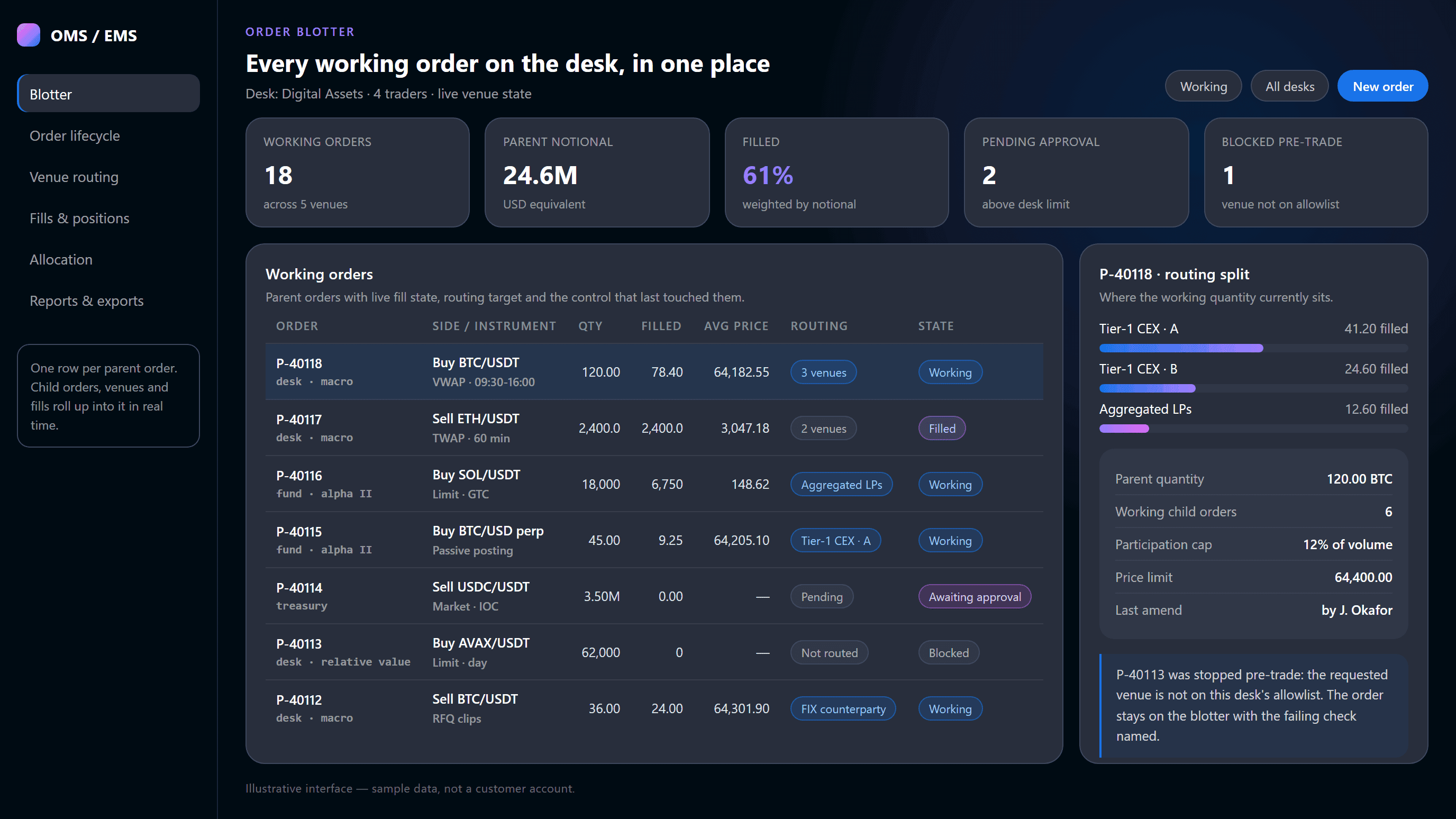
Every working order on the desk in one place, with fill state, routing target and the last control that touched it. Traders see their book, a head of desk sees the desk, a reviewer sees the outliers — the same records, scoped by role.

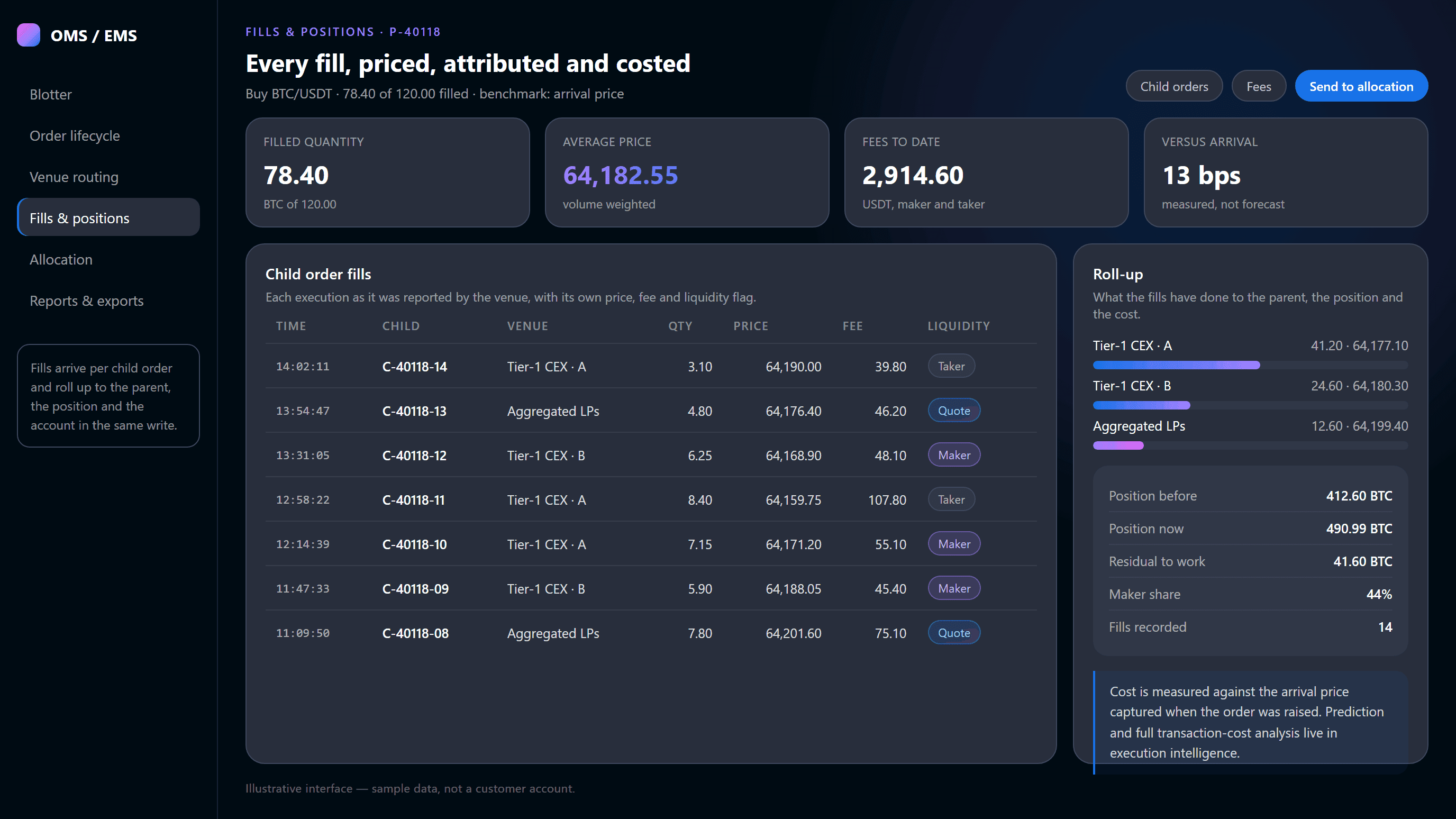
  • Parent orders with live filled quantity, average price and venue split
  • Order type, time in force, strategy tag and client reference on the row
  • Orders held for approval and orders blocked pre-trade stay visible, not hidden
  • Amend, cancel and re-route from the blotter without leaving the screen
OMS blotter showing working orders, venue routing and fill breakdown
DEPLOYMENT

Connect. Configure. Control. Go Live.

What it takes to put the OEMS in front of a desk. Most of the work is configuration, because the venue connectivity, market data and reporting are already part of the stack.

1

CONNECT

The system deploys inside your infrastructure and connects to the venues you already trade: tier-1 exchanges, aggregated liquidity, on-chain venues, your internal book and FIX counterparties. Entry is FIX 4.4, REST and WebSocket.

2

CONFIGURE

Desks, accounts, funds and roles are modelled first, then the controls on them: credit and notional limits, price collars, participation caps, venue allowlists and the notional above which an order needs a second approver.

3

CONTROL

Traders, heads of desk, operations and reviewers get scoped access to the same records. Approval routes, override-reason requirements and report schedules are yours to set, and every change to them is recorded.

4

GO LIVE

The desk runs on the blotter, with pre-trade controls enforced on every order and reporting generated from the order records. Staging environments stay available for testing new venues or limits before live flow.

HOW THE SYSTEM WORKS

The Order Never Leaves the Record

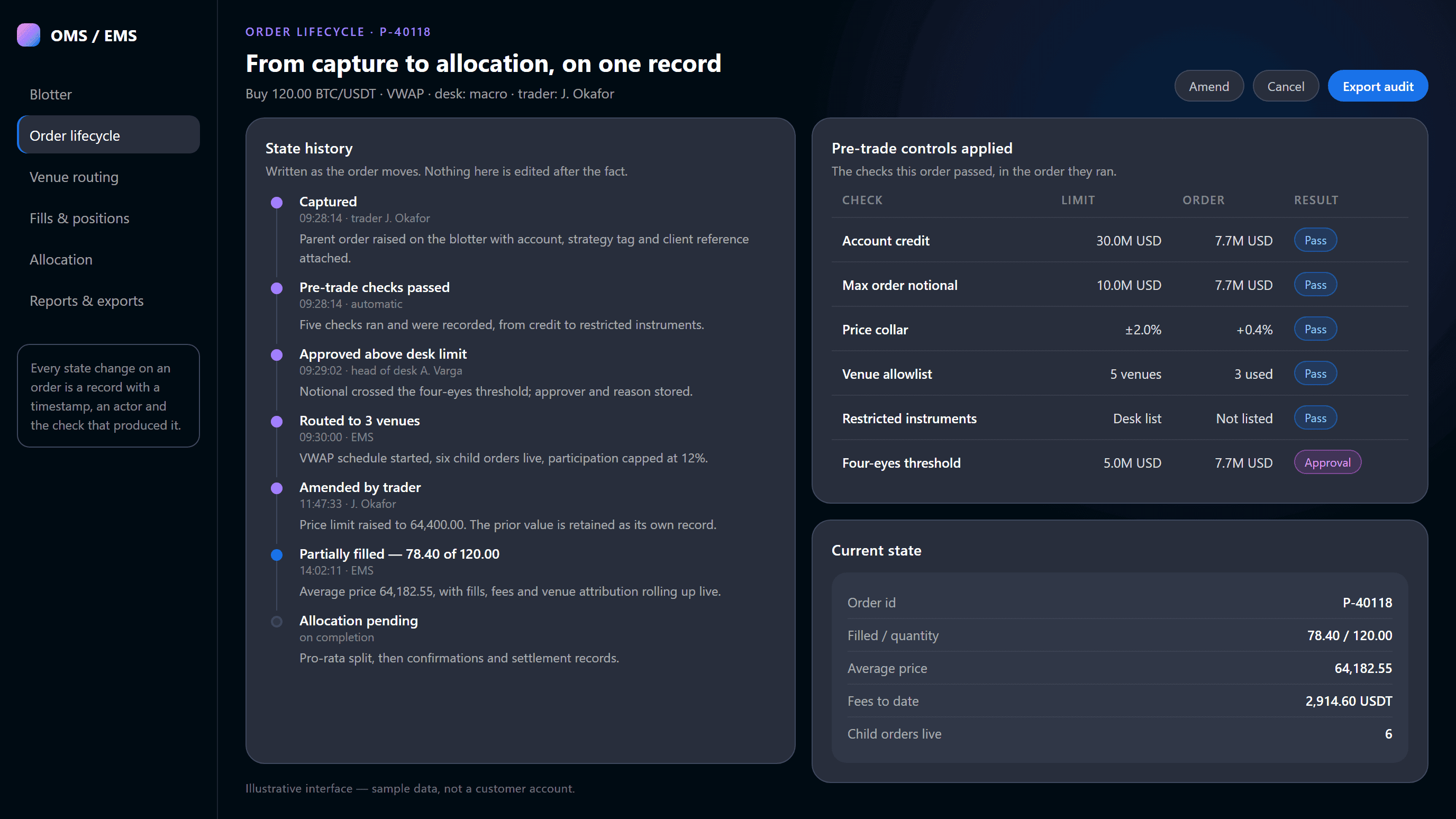
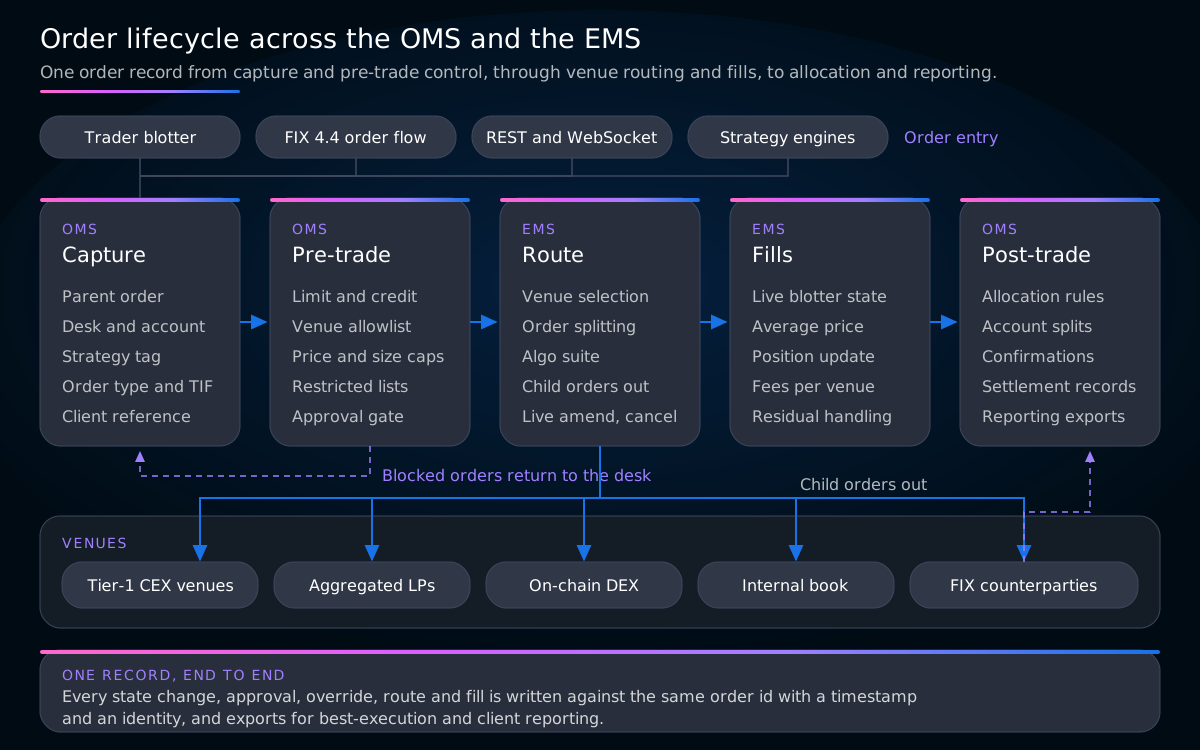
Capture, pre-trade control, routing, fills and post-trade are separate subsystems doing separate jobs, but they write to one order record. That is the difference between an OEMS and an OMS bolted to a separate execution tool.

Diagram: order lifecycle from pre-trade checks through venue routing, fills and post-trade allocation

Orders enter from the blotter, FIX, REST or a strategy engine; the OMS captures them and runs pre-trade controls; the EMS selects venues and works the child orders; fills return with venue attribution; and the OMS closes with allocation, confirmations and reporting — all against one order id.

CAPABILITIES

What an Institutional Desk Needs the System to Do

Six subsystems, one order record. The visible half is the blotter and the routing; the half that decides whether operations and compliance trust the platform is everything after the fill.

ORDER MANAGEMENT

Order capture, staging and the blotter

The order record starts here: instrument, side, quantity, order type, time in force, desk, account and strategy tag. Parents can be staged, released, amended, cancelled or split.

  • Parent and child order hierarchy with live roll-up
  • Desk, fund, sub-account and strategy modelling
  • Order state visible to trader, desk head and reviewer
PRE-TRADE RISK

Controls before anything reaches a venue

Every order passes credit and limit checks, maximum notional, price collars, venue allowlists and participation caps before a child order exists. Above your thresholds it waits for a second approver.

  • Operator-defined limits per desk, account and instrument
  • Four-eyes approval above configurable notional thresholds
  • Blocked orders stay on the blotter with the failing check named
EXECUTION MANAGEMENT

Routing, algos and live order handling

The EMS decides where the size goes and works it: venue selection from live depth and fee-adjusted price, order splitting, scheduled and passive tactics, request-for-quote clips, and live amend or re-route.

  • Venue selection and splitting inside desk participation limits
  • Scheduled, passive and quote-driven tactics on the same order
  • Amend, cancel and re-route without losing the order record
Learn more
POST-TRADE

Allocation, confirmations and settlement

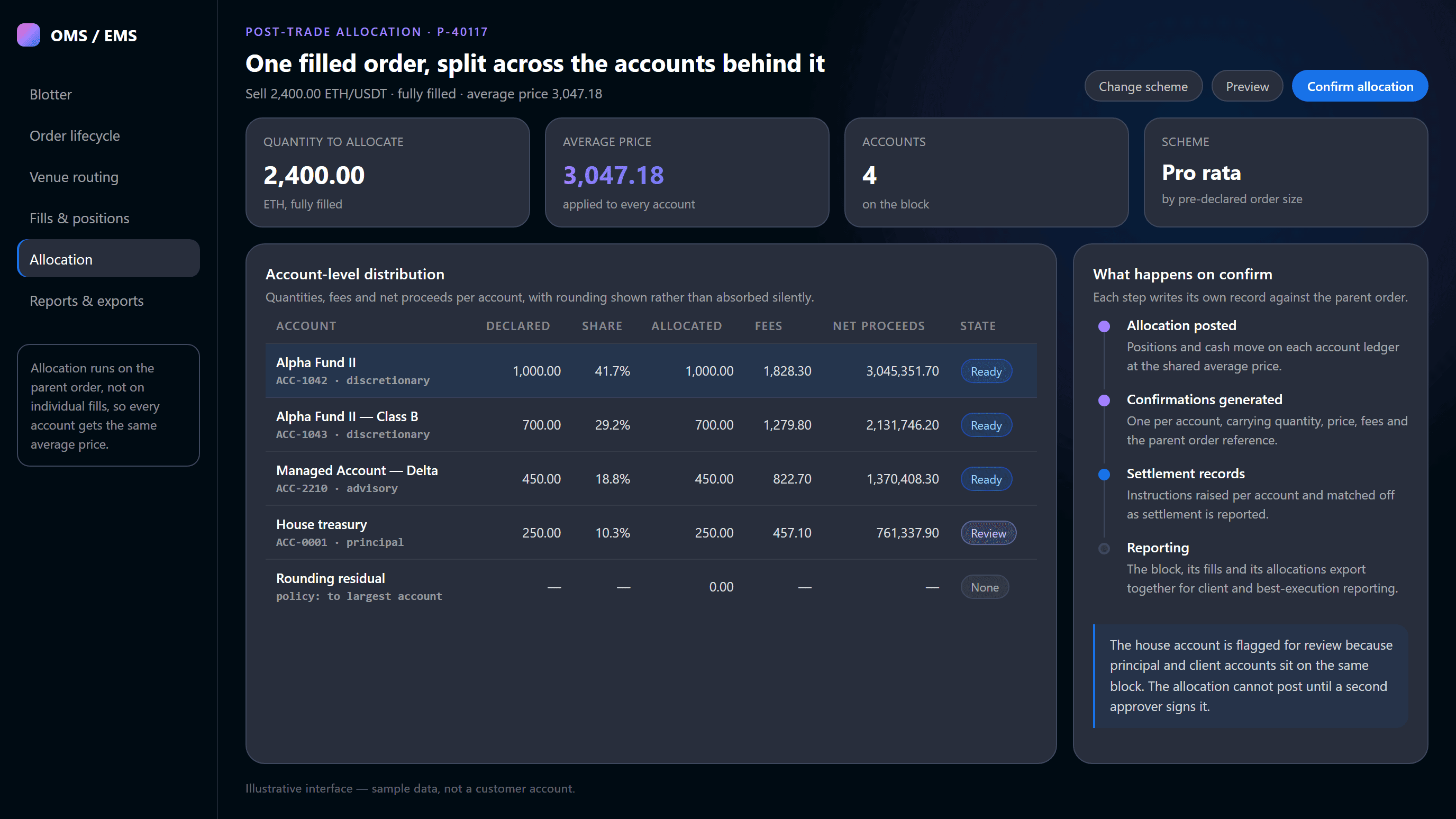
A completed block allocates to its accounts at the block average price, with fees and net proceeds per account and a stated rounding policy. Mixed principal and client blocks route to a second approver.

  • Pro-rata and explicit per-account allocation schemes
  • Confirmations and settlement records per account
  • Second-approver review on flagged blocks
REPORTING

Institutional and best-execution reporting

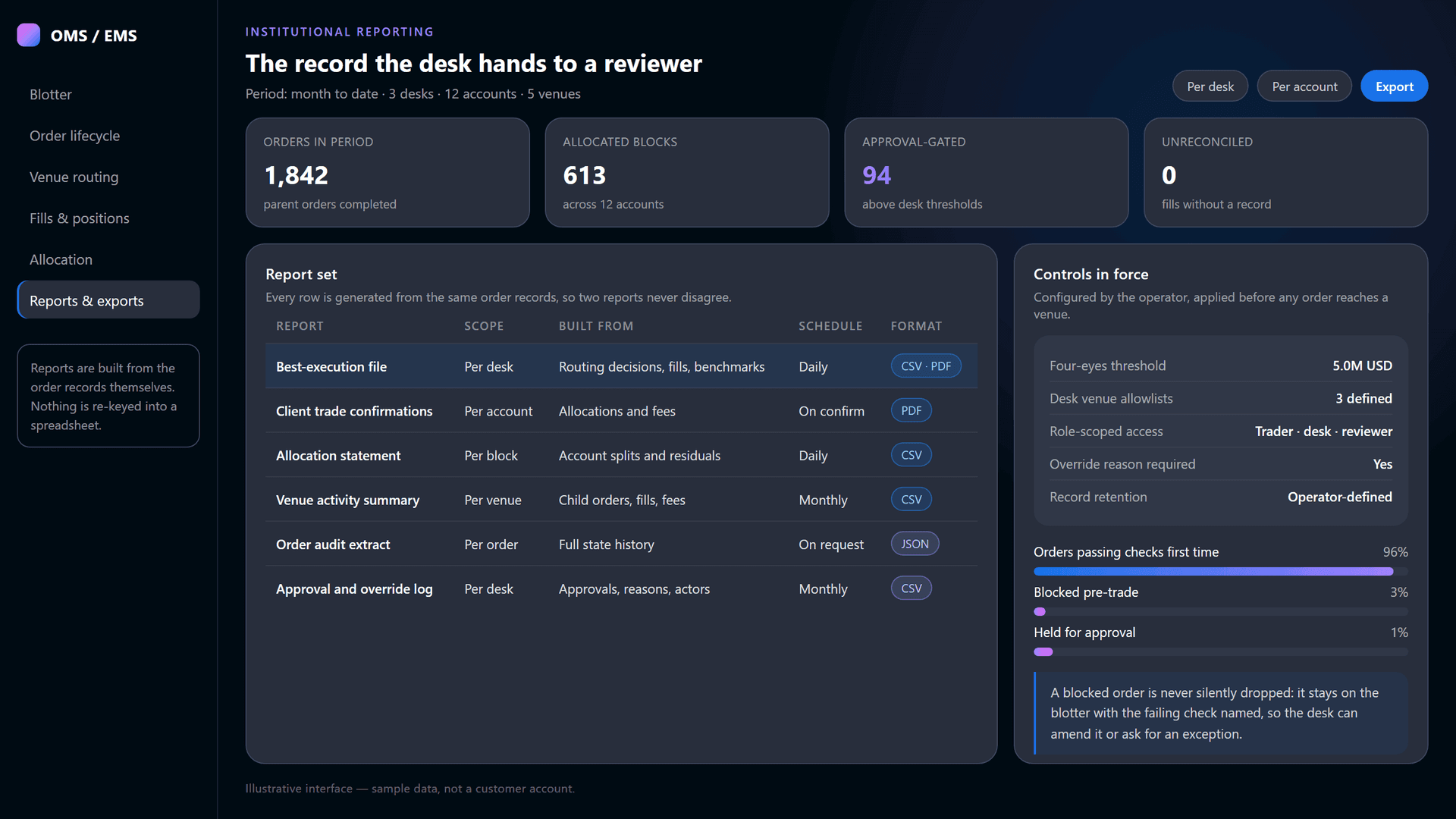
Reports are generated from the order records rather than assembled afterwards, so the best-execution file, the client confirmation and the allocation statement all describe the same trade.

  • Best-execution files, allocation statements and venue summaries
  • Approval and override logs with actor and reason
  • Full order audit extract for a single order, on request
CONNECTIVITY

FIX 4.4, REST and WebSocket order flow

Order entry arrives over FIX 4.4, REST and WebSocket, so existing front ends and counterparties keep working. Outbound, the same fabric reaches exchanges, aggregated liquidity and on-chain venues.

  • FIX 4.4 order entry and drop-copy sessions
  • REST and WebSocket APIs for order, fill and position data
  • Session health per venue visible on the routing screen
Learn more
OMS VS EMS

Two Jobs, One System

The OMS owns the order as a record; the EMS owns the order as an execution. A desk that runs them as separate products spends its day reconciling the two — which is the case for combining them in one OEMS.

#ResponsibilityOMS — the order as a recordEMS — the order in the market
1Order capturewhere the order beginsParent order with account, desk, strategy tag and client referencethe system of recordChild orders derived from the parent and sent to venuesworking instructions
2Risk and compliancewhat is allowedCredit, limits, collars, restricted lists and approval gatesenforced before routingParticipation caps and price limits applied to each child orderenforced during execution
3Venue decisionswhere the size goesWhich venues a desk is permitted to reach at allthe allowlistWhich permitted venue gets which share, and in what orderthe routing rule
4Execution tacticshow the order is workedRecords the tactic chosen and any override, with its reasonfor later reviewRuns the tactic: scheduled, passive, aggressive or quote-drivenalgo suite inside the EMS
5Fillswhat actually happenedRolls fills into the parent order, the position and the accountone average priceReceives fills per venue with price, fee and liquidity flagvenue attribution
6Post-tradeafter the market is doneAllocation, confirmations, settlement records and reportingthe OMS owns thisHands the completed block and its attribution to the OMSno re-keying
PRODUCT WALKTHROUGH

See the Blotter Worked End to End

A recorded walkthrough of one parent order — raised, checked, approved, routed across three venues, filled and allocated — is in production. Until it is published, the fastest way to see the system is a live session on your own order flow.

No video available
Video Coming Soon
OPERATOR CONTROL

The Desk Trades. The Operator Sets the Boundaries.

Nothing in the system is discretionary about what it may do. Limits, allowlists, approval thresholds and access scopes are operator-defined, and the record of what happened is generated rather than assembled.

Operator-defined limits per deskCredit and notional limits, price collars, child order size, participation caps and venue allowlists per desk, account and instrument.
Four-eyes approval above your thresholdsYou set the notional at which an order needs a second person. Above it the order holds, and the approver, rule and reason are recorded.
Override tracking with the reason attachedWhen a trader overrides a routing decision, the original, the override, the reason and the achieved result stay on the same order.
Role-scoped access across desk and entityBlotter, approvals, allocation and reporting scoped per role, desk and entity, so a reviewer reads exceptions without touching orders.
Reporting generated from the order recordsBest-execution files, confirmations, allocation statements and audit extracts build from the same records, so two reports never disagree.
Boundaries named on the blotterAn order stopped by a control does not fail silently: the limit, collar or allowlist that stopped it is named on the blotter.
See it on your order flow
CONNECTIVITY AND COVERAGE

Integration Depth, Not a Venue Count

The advantage of an OEMS that ships with the exchange, the liquidity and the analytics is that a venue is connected once and is then visible everywhere — in the router, on the blotter, in the fills and in the report.

FIX 4.4

Order connectivity

Order entry over FIX 4.4, REST and WebSocket, so existing front ends and counterparties reach the blotter without a rewrite.

FIX 4.4RESTWebSocketDrop copy
Multi-venue

Venue classes reached

Tier-1 centralised exchanges, aggregated liquidity providers, on-chain venues, the operator internal book, and FIX counterparties for block flow. Each class is enabled per desk.

Tier-1 exchangesAggregated liquidityOn-chain venuesInternal book
Multi-account

Desks, funds and accounts

Desks, funds, sub-accounts and legal entities are modelled explicitly, which is what makes a per-desk allowlist, an account-level allocation and an entity-scoped report possible.

Desk hierarchyAccount splitsEntity scoping
CONNECTED STACK

What the OEMS Is Wired Into

The reason this system is worth deploying rather than subscribing to is what already sits beside it. Liquidity, execution analytics, the algo suite and venue connectivity are parts of the same stack, not integrations you sequence over two quarters.

execution analytics & TCA

Execution Intelligence predicts slippage and fill probability before an order goes out and measures achieved quality afterwards. The OMS/EMS carries the order; that page carries the transaction-cost analysis on it.

aggregated multi-venue liquidity

Coiny's deployed liquidity service is one of the venue classes the router reaches. Depth and fee-adjusted price arrive live from the same aggregation that fills the child orders on your blotter.

FIX connectivity

Integrations covers the venue and platform plumbing underneath the OEMS: FIX bridges, MT5 and cTrader connectivity, and the payment, custody and compliance providers a desk's operations depend on.

smart execution & portfolio automation

The execution algorithms the EMS runs — scheduled and participation-based tactics, large-order splitting and portfolio rebalancing with cost previews — are configured and documented there.

derivatives trading platform

Perpetual and futures order flow runs on the same blotter, the same pre-trade controls and the same allocation workflow as spot, with margin and position data from Coiny's derivatives engine.

crypto trading infrastructure

The OMS/EMS is one layer of Coiny's trading and execution stack, alongside the spot and derivatives engines, aggregated liquidity, quant systems and RWA markets.

institutional knowledge assistant

Desk procedures, counterparty terms and trading documentation, answered with citations and permission-aware access. The blotter tells you what happened; that tells you what the desk agreed.

BUILT FOR

Desks That Have Outgrown a Trading Screen and a Spreadsheet

The point at which a firm needs an OEMS is rarely volume. It is the first time an order has to be justified to somebody who was not there when it was worked.

Institutional trading desks

One blotter instead of five exchange screens, pre-trade limits that hold, and an order record that answers where the size went.

Funds and asset managers

Managers trading one block for several accounts, needing allocation at a single average price and per-strategy reporting.

Prop and multi-strategy desks

Several strategies and traders against shared limits, needing desk hierarchy and approval routes that stop an order, not flag it.

Exchange and brokerage operators

Operators offering order and execution management to their own institutional clients, with per-client scoping and risk policy.

COMMON QUESTIONS

FAQ

An OMS (order management system) is the system of record for an order, and an EMS (execution management system) is the system that works that order in the market. The OMS captures the parent order with its account, strategy and client reference, runs pre-trade risk and compliance checks, and owns allocation, confirmations and reporting afterwards. The EMS selects venues, splits the parent into child orders, runs execution algorithms and manages live amends, cancels and fills. Coiny combines both in one OEMS, so the desk works a single blotter.

A crypto OEMS is an order and execution management system for digital assets: one platform that captures institutional orders, enforces pre-trade risk controls, routes across multiple trading venues, and handles fills, allocation and reporting on the same order record. Coiny Exchange deploys its OEMS inside the operator's own infrastructure, pre-integrated with the exchange, liquidity and analytics stack, rather than as a hosted service connected to venues one integration at a time.

Coiny's OMS/EMS runs credit and limit checks against the account, maximum order notional and price collars, venue allowlists per desk, restricted-instrument lists, and participation caps, then applies a four-eyes approval gate above the thresholds the operator sets. Every check is recorded against the order. An order that fails a check is never silently dropped: it stays on the blotter with the failing check named, so a trader can amend it or request an exception.

Post-trade allocation splits a filled block across the accounts behind it, at the block's average price, so no account is advantaged by the order in which fills arrived. Coiny's OMS/EMS supports pro-rata allocation against pre-declared order sizes and explicit per-account splits, applies a stated rounding policy rather than absorbing residuals silently, and then generates confirmations and settlement records per account from the same order data.

Coiny's OMS/EMS routes to the venue classes an institutional desk actually uses: tier-1 centralised exchanges, Coiny's aggregated liquidity providers, on-chain venues, the operator's own internal book, and FIX counterparties for request-for-quote and block flow. Venues are enabled per desk by the operator, and an order can only reach a venue on that desk's allowlist, with participation and price limits applied to every child order.

Yes. Coiny's OMS/EMS deploys as part of the operator's own infrastructure and under the operator's brand, rather than as a hosted platform their orders pass through. It ships pre-integrated with the Coiny exchange, liquidity and execution analytics stack, so venue connectivity, market data and reporting arrive configured. Desks, accounts, venue allowlists, risk thresholds and approval rules are all operator-defined, and the order records stay in the operator's environment.

Coiny's OMS/EMS builds every report from the order records themselves, so two reports never disagree. The set covers best-execution files per desk, client trade confirmations per account, allocation statements per block, venue activity summaries, approval and override logs, and a full order audit extract carrying the state history of a single order. Reports export on a schedule or on request, in file formats a reviewer or auditor can work with.

DEPLOY THE OEMS

Bring Your Own Order Flow to the Session

Walk the whole system on a desk that looks like yours: the blotter, the pre-trade controls you would set, routing across your venue classes, an allocation across your account structure, and the reports a reviewer would ask for.

Book a Desk Demo